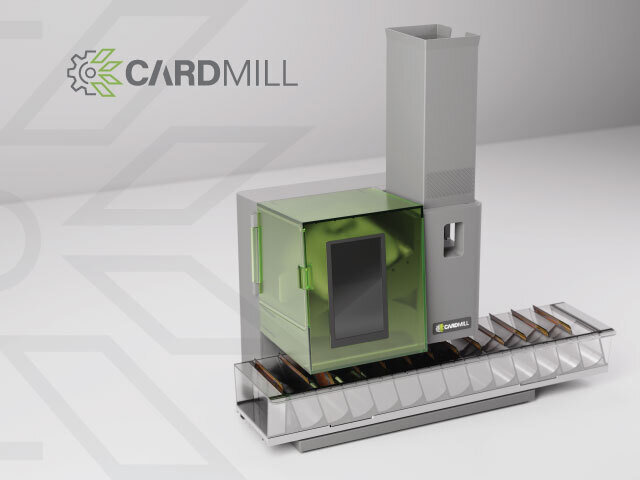
CardMill™ - A TCG scanner and sorter for players/collectors
Created by CardMill™
Organize your trading card collection effortlessly with CardMill™ - an intelligent automated TCG scanner and sorter built for everyday collectors and players. Scan and sort using customizable sorting methods including alphabetical, set, card type, color/attribute, rarity, pricing tiers and more.
Designed with interchangeable trays (26-slot alphabetical and 13-slot multi-sort) and 400-800 card hopper capacity. CardMill supports your favorite TCGs including: Magic: The Gathering, Pokémon, Yo-Gi-Oh!, Disney Lorcana, Flesh and Blood, Star Wars Unlimited, One Piece, Sorcery Contested Realm, and Riftbound, and more to come.
Latest Updates from Our Project:
CardMill Update: Forging Ahead
19 days ago
– Sun, Sep 13, 2026 at 12:32:46 PM
There is a tremendous amount happening at CardMill right now. This is one of the most active stages of the project yet. Tooling is progressing. Critical components have been molded and tested and PCBs have been designed, ready for final production. Firmware and software development are being finalized. Packaging is moving forward. Fulfillment and compliance testing are being planned. Accessories are being made. Across every part of CardMill, we continue to test, refine, troubleshoot, and improve.
Tooling in progress: molds for the aluminum tray base, singulation flap, and card cam.
Many of the most critical components involved in card feeding, singulation, and tray movement, as well as our PCBs, have already been manufactured and tested in our advanced prototypes. These systems also performed extremely well throughout four full days of demonstrations at PAX West where we scanned thousands of cards across hundreds of batches.
Tooling for the remaining production parts is underway, and our first fully injection-molded production-validation units are currently expected to arrive between late October and early November. Once they arrive, we will complete final verification of their fit, assembly, performance, and quality. If everything performs as intended, we can approve the design for mass production.
This places us approximately two to four weeks later than the timeline we originally estimated. To minimize further movement, we and our manufacturing partner are keeping as many workstreams moving in parallel as possible, including tooling, component sourcing, PCB assembly, packaging preparation, and production planning.
Because one full-service manufacturing partner is coordinating all these areas, we can reduce delays between separate suppliers and respond quickly as parts and samples become available. We are also keeping reviews and decisions moving as quickly as possible while protecting the testing and quality standards CardMill needs before mass production.
This roadmap reflects our current best estimates. Testing may reveal that a component or molded part needs adjustment, which could shift the remaining schedule. We will provide another timeline update after the fully molded units arrive and production validation is underway.
Each CardMill contains approximately 76 individual parts, including molded components, electronics, motors, fasteners, magnets, and other hardware. Bringing all of these pieces together into a reliable, repeatable, and manufacturable product is no small feat, and reaching this stage is a major milestone for our team.
CardMill Parts: Some of the 76 parts that go into one device.
We wanted to show the render of the production tray look we are going for. The prototypes you may have seen running in videos have always had a solid 3D printed or cast molded tray, where the final production models will be injection molded. All production trays will be made with a translucent outer hard shell and a soft rubber bottom to help protect your card edges and create a near silent sound with card placement.
We just got back from PAX West this past weekend which was CardMill's first real public debut! The Mills ran for 4 days straight without any major issues and we met thousands of people who were very excited and in awe of what this little compact device can do.
We held two live streams direct from the booth for a live price sort of an unopened box of Riftbound and MTG. PAX attendees had a chance to guess the total value of the box for a chance to receive the box and all cards included. Jonathan did an unscripted Q&A and discussed CardMill features on air while everyone watched the CardMill process. Check them out below!
We had so much fun doing the livestreams and looks like backers loved seeing everything in action that we have decided to do more livestreams every month or so. We'll use that time to showcase various features and functionality, and to allow you to ask questions live. Look out for event info here on Kickstarter, on Discord, and on our Socials.
Sidenote: We did find an error in the price sort and will be fixing that on the software end.
Our PAX West 2026 Backer Mat: about 65 backers visited us and got to see CardMill live in action! Backers, be sure to stop by and sign our mat at our next convention. Convention/show schedule will be posted when available.
It is difficult to capture just how many moving pieces are coming together behind CardMill. Our small team is working incredibly hard across engineering, tooling, electronics, software, manufacturing, testing, compliance, marketing, packaging, and logistics; often all at once.
What once seemed simple in my head has become a complex creature combining mechanical engineering, electronics, optics, software, AI, manufacturing, and trading card data, all of which must work together reliably, card after card.
I won’t sugarcoat it: we’re tired. This past year has brought long days, very late nights, setbacks, breakthroughs, and more problem-solving than I ever imagined. But I'm also incredibly energized because CardMill is closer than ever to becoming the product I have spent so long envisioning. Receiving our first fully injection-molded units will be one of the biggest milestones we have reached yet.
Seeing those pieces finally come together makes all the work worthwhile. I'm so proud of how far CardMill has come, and we’re going to keep pushing through the work ahead. I'm committed to delivering a device that we can all be proud to use, and I won't compromise on quality simply to rush a product out the door. At the same time, delivering CardMill's to our backers as soon as possible remains my top priority.
Thank you for your patience, support, questions, and encouragement as we bring CardMill to life.
Updated Video with the most recent CardMill advanced prototype.
Behind the Scenes: The CardMill Platform
3 months ago
– Sun, Jul 19, 2026 at 10:52:13 AM
Over the past several months, we've shared updates on engineering, manufacturing, and hardware development. Today, we'd like to pull back the curtain on another major part of CardMill: the CardMill Platform.
While the CardMill unit handles the physical work of scanning and sorting your cards, the platform is where everything comes together. It's where you'll review scans, manage your inventory, search across supported trading card games, export and interact with your collection long after the cards have been scanned.
Today, we're sharing a look at several areas of the platform along with some of the functionality that's already in place. This is Part One of the CardMill Platform overview.
We thought the best way to kick off this update was with a "quick" tour of the CardMill Platform. Take a few minutes to watch the video above, then keep scrolling for a closer look at many of the features and screenshots highlighted throughout this update.
The Dashboard serves as your command center for everything happening within the CardMill Platform. From a single screen, you'll be able to monitor your collection, track active scanning sessions, view connected CardMill units, review recent activity, and quickly jump into the areas you use most.
You'll also be able to track your collection's historical value over time, monitor your most valuable cards, view your latest scans, follow collection growth, and keep an eye on active batches all at a glance.
The Dashboard is designed to be your home within the CardMill Platform, bringing together your collection, your devices, your scanning activity, and the insights that matter most.
As CardMill scans your cards, the Live View updates in real time so you can follow the progress of your scanning session on your computer or tablet. This means you can keep an eye on your CardMill even if you're not in the same room. It will alert you if the tray is full or of any errors. If you have multiple units linked to your accounts, you'll be able to see activity on each of those units.
For each scan you'll see:
The scanned card alongside the matched result
Trading Card Game
Set
Card name
AI confidence score
Watching your collection appear card by card is one of our favorite parts of the experience.
Every scanning session is saved as a batch, making it easy to review your results whenever you're ready. Batches are separated by CardMill Unit, TCG selected, and the name you've given your batch.
The Batch Detail page provides a complete view of every card that was scanned, including side-by-side images of the scanned card from your CardMill unit and the matched result.
You'll also find:
Batch statistics
Confidence scores
Individual card editing
Value of the card and the whole batch at the time of viewing
Bulk editing tools for the entire batch
Whether you're reviewing a handful of cards or thousands at a time, the workflow is designed to be fast and intuitive. You have the option to approve individual cards, or the batch as a whole. Cards are not added to your inventory until you've approved them to be. If you've made a mistake, no problem, you can revert any approved cards from your batch to remove them from your inventory.
Your inventory is organized by Trading Card Game and provides quick access to your collection.
From here you can:
View card images and details
Track quantities across your collection
Manage finishes, languages, and conditions
Add or remove copies
Search and filter your collection
Import existing collections
As your collection grows, you may want to use it with the tools you already know and love.
The CardMill Platform allows you to export your inventory in multiple formats so your collection can easily move between applications.
Currently supported formats include:
CardMill CSV
Generic CSV
Deckbox
Moxfield
Archidekt
We're also actively building dedicated export formats for popular collection managers and marketplaces, including:
TCGplayer
eBay
ManaBox
Cardmarket
If there's another platform you'd like us to support, let us know. We're also open and exploring dedicated integrations with some of your favorite platforms.
Whether you're researching a card or managing your collection, the Card Details page brings everything together in one place.
From here you'll be able to:
View detailed card information
Browse other printings
See your inventory across every version of the card
Review current market pricing
View historical price trends
Jump directly to marketplace listings
Manage your inventory with a single click
Outlined above are only part of what the Core CardMill Platform offers. We'll be posting more updates and walk through videos of all the bells and whistles in future updates. Additional functionality already in place or to be implemented includes:
Collection Management
Search across all supported TCGs
Batch inventory updates
Bulk editing
Advanced filtering
Collection statistics
Database
Multiple printings
Card details
Historical pricing
Marketplace links
Filtering tools to narrow your search down by key card characteristics including color/ink/etc, card type, rarity, and more
Find that diamond in a rough using the Targeted Search feature and be notified when those sought after cards are found by value or card name
Inventory
Import and Export in multiple formats
Batch add to inventory based on filtered search results
Inventory management
Language, finish, and condition selection
Tagging
CardMill Integration
CardMill device management
Live View
Batch Review
Scan history
Defaults to make scanning more efficient
Our goal has always been to build more than a scanner. We're building a platform that helps collectors organize, manage, and enjoy their collections every day. We expect continual growth and evolution of our platform to meet the needs of our user base.
We're excited to share that we'll be at Pax West, September 4-7th, in Seattle this year. Come by Booth 4113 and check out the prototypes in person! Let us know that you're a backer and we might have some goodies for you too.
We are firing away on all cylinders here and very, very busy tackling everything from packaging, fulfillment planning, optimizing performance, software/UI dev and continual testing and revisions. We have received our final works like, looks like, prototype models. We're working with manufacturers to solidify the golden units and receive our first shot parts. Tooling and molds are underway, and we've received some of the most critical manufactured parts that are already powering the current prototypes.
Be sure to join and follow us to stay in the know.